Announcements allows coaches, supervisors, and other users with appropriate permissions to broadcast announcements directly to the desktops of agents and teams. You can use announcements to send short messages, like birthday wishes or congratulations for a team milestone. You can send attached files for longer communications.
If you have announcements waiting to be viewed, an exclamation mark in a red circle appears over the Announcements icon (indicated by a paper airplane) in the toolbar.
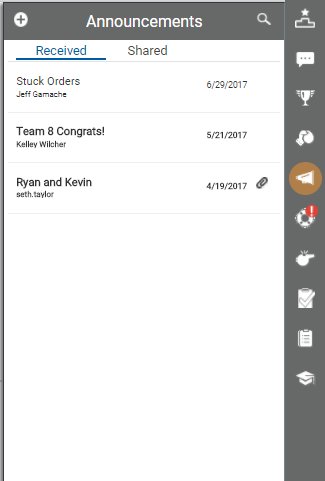
- Click the Announcements icon on the toolbar to display the announcements pane, which opens on a tab with a list of announcements you have Received. If you do not see the announcement you want, you can search for it by clicking the magnifying glass in the upper right corner of the pane.
-
 (OPTIONAL) Create announcements.
- Click the Add icon (indicated by a plus sign in a white circle) in the upper left corner of the announcements pane.
- Type a Title.
- Type a brief message in Details, attach a file containing your announcement, or both.
- Click the Recipients icon (indicated by a blue circle in the upper left corner).
- Select the checkbox for one or more roles. Your announcement will be shared with all users who have that role.
- Click Share or, if you change your mind, click Cancel to return to the list of announcements.
- Click an announcement to read it in its entirety.
-
(OPTIONAL) Edit announcements.
- Click the announcement you want to edit.
- Click the Edit icon (indicated by a pencil) in the upper right corner of the announcements pane.
- Revise the Title or Details, attach a file, or do any combination of these.
- When you have finished your edits, click Share or, if you change your mind, click Cancel to return to the list of announcements.
- (OPTIONAL) To see a list of announcements you have shared, click the Shared tab.
- When you are finished using the feature, click anywhere on the screen other than the announcements pane to close it.


