Your coin history allows you to see your coin balance, the sources of coins you have earned, and the items on which you have spent coins. This topic explains how to view and understand your coin history.
Access Your Coin History
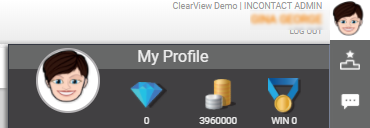
- Click the profile icon (indicated by the person image next to your name in the upper right corner).
- Click the coins icon.
Understand Your Coin History
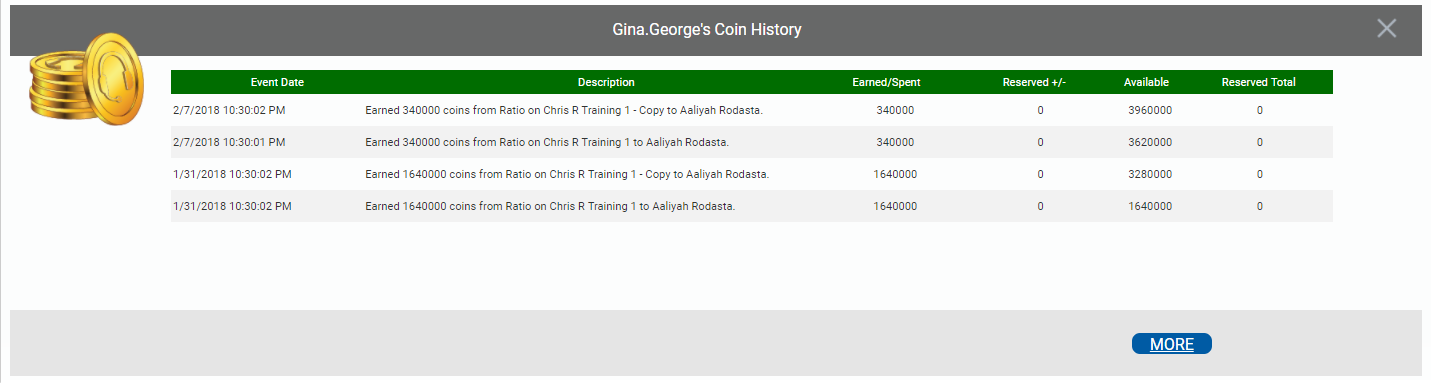
- Event Date
- Displays the date and time of the event (that is, coin transaction). The coin history is sorted in descending order by event date. If you have more events than can be displayed on one screen, you can click More to see them.
- Description
- Provides a recap of the event in which you either earned or spent coins.
- Earned/Spent
- Displays the total number of coins earned or spent in the event.
- Reserved +/-
- Displays the number of reserved coins added or subtracted as a result of the event. Reserved coins are coins you have earned based on a rule, but that have not yet been paid out. A subtraction event means the coins have been paid and are now part of your available balance.
- Available
- Displays your total coin balance as a result of the event.
- Reserved Total
- Displays your total reserved coin balance as a result of the event.


