Required security profile permissions: Agent Issues Close
Archive Agent Issues

-
Click Admin → Support → Agent Issues.
- Select the checkboxes to the left of each agent issue you want to archive.
- Click Archive.
- To view the archived issues, click the Filter button to the right of the search box, select View Closed Issues, and click Apply.
Unarchive Agent Issues
-
Click Admin → Support → Agent Issues.
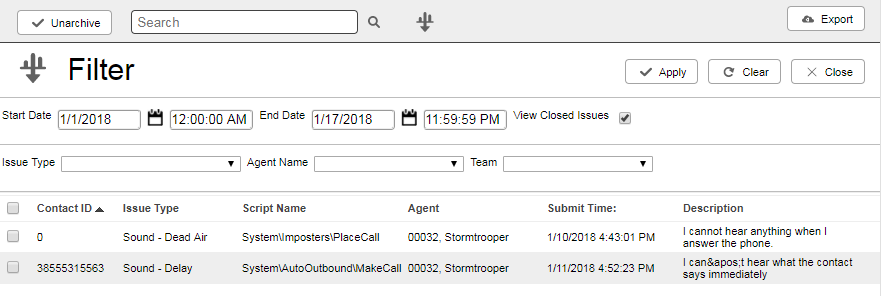
- Click the Filter button to the right of the search box.
- Select your preferred date range. Select the View Closed Issues checkbox. Click Apply.
- Select the checkboxes to the left of each closed agent issue you want to unarchive.
- Click Unarchive.
- To view the unarchived issues, clear the View Closed Issues checkbox and click Apply.


