Required security profile permissions: Agent Issues View
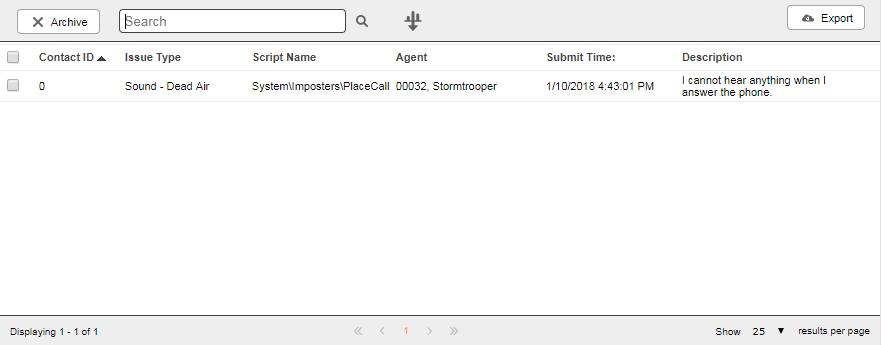
- Contact ID
- If the agent was handling a contact while sending feedback, the unique ID associated with that contact. If the agent was not handling a contact, the value is 0.
- Issue Type
-
The type of issue the agent selected from those available in Agent. It is one of the following: Unknown, Contact - Dead Air, Contact - Delay, Contact - Disconnected Unexpectedly, Contact - Refusing Unexpectedly, Contact - Abandon, Sound - Broken, Sound - Echo, Sound - Static, Sound - One Way, Agent - Agent, Agent - Crash, Agent - Failure to Log In, Agent - Incorrect Behavior, Agent - Reports, Agent - Display Issue. See the MAX documentation for the agent-facing descriptions of these categories.
- Script Name
- The name of the script that was running as the agent submitted feedback.
- Agent
- The name of the agent who submitted the issue in the format <Last Name>, <First Name>.
- Submit Time
- The date and time at which the agent submitted the issue.
- Description
- The agent's description of the issue.
Filter Agent Issues Form
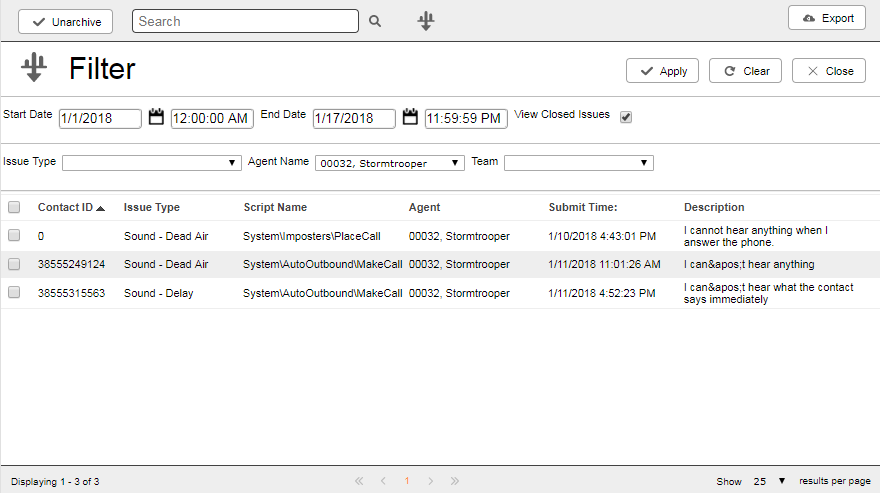
- Start Date
- Specifies the earliest date and time from which you want to see agent issues. Click the calendar icon to use the date picker.
- End Date
- Specifies the latest date and time from which you want to see agent issues. Click the calendar icon to use the date picker.
- View Closed Issues
- When selected, the table displays only archived agent issues. Otherwise, the table displays only unarchived agent issues.
- Issue Type
- Filters the agent issues dashboard to include only those of a certain type that occurred in the specified time range. You can select one of the following: Unknown, Contact - Dead Air, Contact - Delay, Contact - Disconnected Unexpectedly, Contact - Refusing Unexpectedly, Contact - Abandon, Sound - Broken, Sound - Echo, Sound - Static, Sound - One Way, Agent - Agent, Agent - Crash, Agent - Failure to Log In, Agent - Incorrect Behavior, Agent - Reports, Agent - Display Issue. See the MAX documentation for the agent-facing descriptions of these categories.
- Agent Name
- Filters the agent issues dashboard to include only those reported by the selected agent in the specified time range.
- Team
- Filters the agent issues dashboard to include only those reported by a member of the selected team in the specified time range.


