Required security profile permissions: Skills Edit and Dialing by Proficiency Edit
Personal Connection (PC) distributes calls to agents based on several factors, including the agents' wait time, current number of simultaneous calls, and, optionally, proficiency level. You can change the weight of these factors to control how PC determines which agent receives the next call.
-
Click Admin → Account Settings → Business Units.
-
Locate the business unit where you want to enable agent prioritization for call delivery. Click the business unit to open it.
-
In the Details tab, click Edit. Scroll down to the Outbound Strategies section. Select the Enable Dialing by Proficiency checkbox. You may modify the default call distribution factor settings, but use caution. You should consult your account manager prior to attempting any adjustments to the default values.
-
Click Routing → Skills.
-
Locate the PC skill for which you want to modify the agent prioritization formula. Click a skill to open it.
-
Click the Parameters tab to open it. In General Settings, click Edit.
-
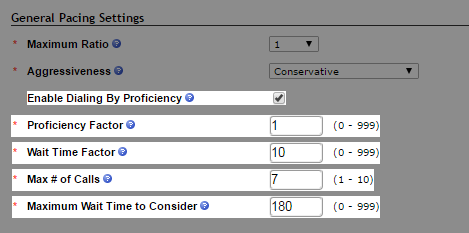
Under General Pacing Settings, select the Enable Dialing by Proficiency checkbox. The call distribution factor settings appear. You may modify the default settings, but use caution. You should consult your account manager prior to attempting any adjustments to the default values.
- Click Done.


