Required security profile permissions: Script Schedules View
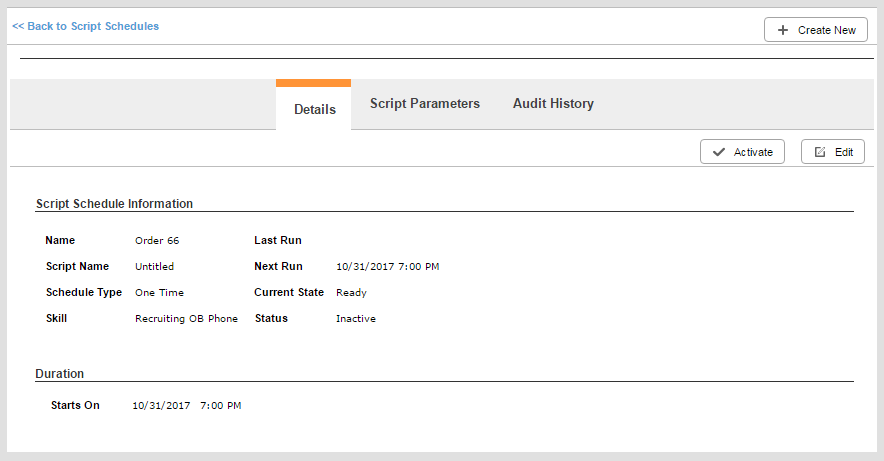
Details Tab
- Name
- Displays the name given to the schedule when it was created.
- Last Run
- Displays the date and time the schedule last ran.
- Script Name
- Displays the name of the Studio script to which the schedule is applied.
- Next Run
- Displays the date and time the schedule will run next. If the Schedule Type is One Time and the schedule is currently running, the Last Run and Next Run values are the same. If the Schedule Type is One Time and the schedule has finished, Next Run is blank.
- Schedule Type
- Displays a value of One Time, Continuous, or Recurring based on the schedule's configuration.
- Current State
- Displays the current state of the schedule as one of the following: Running indicates a schedule is currently in progress; Finished indicates the schedule has run and will not run again; and Ready indicates that the schedule either has not run yet or has run and can be run again.
- Skill
- Displays the name of the skillClassification used to facilitate the delivery of contacts; assigned to agents based on abilities, specialties, and knowledge against which the schedule is configured to run.
- Status
- Displays the current status of the schedule as Active or Inactive. An active schedule cannot be edited, and a deactivated (inactive) schedule cannot be run.
- Duration
- Displays information about the time period for the schedule. This information varies depending on the Schedule Type.
Script Parameters Tab
This tab displays any custom parameters that were configured for the schedule at the time it was created.


