Required security profile permissions: Agent Patterns Create/Edit
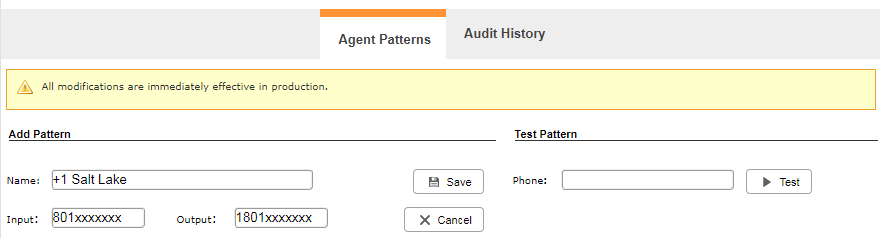
Create an Agent Pattern
Required security profile permissions: Agent Patterns Create
-
Click Admin → Account Settings → Agent Patterns.
- Click Create New.
- Give the new agent pattern a unique Name. Type the numbers you want to match in the Input textbox, inserting an X for each variable. For example, if you were a US-based contact center wanting to match a certain area code, you would type the area code followed by seven X's. Type the numbers you want to change before dialing in the Output text box, inserting an X for each variable.
- Test the new agent pattern by typing a phone number that matches the Input and clicking Test.
- Click Add.
Edit an Agent Pattern
Required security profile permissions: Agent Patterns Edit
-
Click Admin → Account Settings → Agent Patterns.
- Locate the agent pattern you want to modify in the table and click to open it.
- Modify the fields as needed.
- Test the new agent pattern by typing a phone number that matches the Input and clicking Test.
- Click Save.


