Required security profile permissions: External Business Unit View, Business Unit Acceptable File Extensions Create
You can specify the file extensions agents in your business unitFile format associated with Microsoft Excel; may also be expressed as .xlsx can receive as attachments in the Agent applications. The following task explains how to add new file extensions to the list of accepted extensions and to remove extensions that are currently accepted in the business unit from that list.
Add Accepted File Extensions for Agent Applications
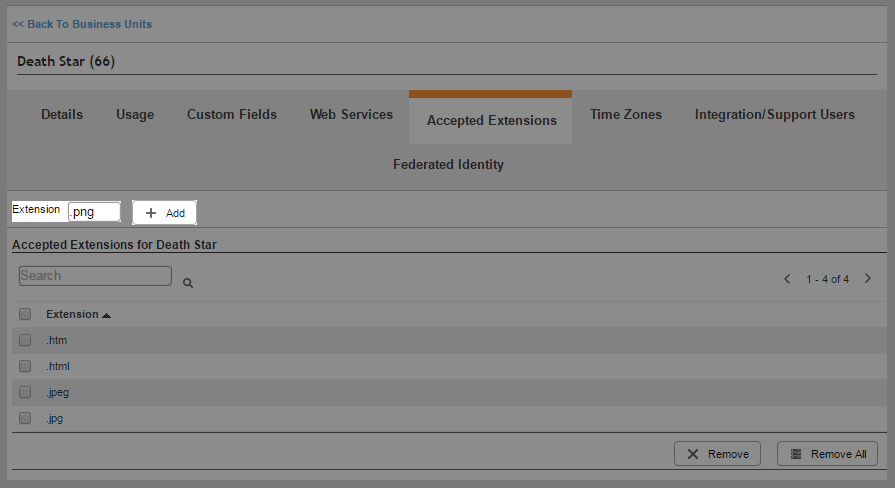
-
Click Admin → Account Settings → Business Units.
-
Locate the business unitFile format associated with Microsoft Excel; may also be expressed as .xlsx you want to modify and click it to open it.
- Click Accepted Extensions.
-
Enter the file extension in the Extension field, beginning with a period (.).
- Click Add.
Remove Accepted File Extensions for Agent Applications
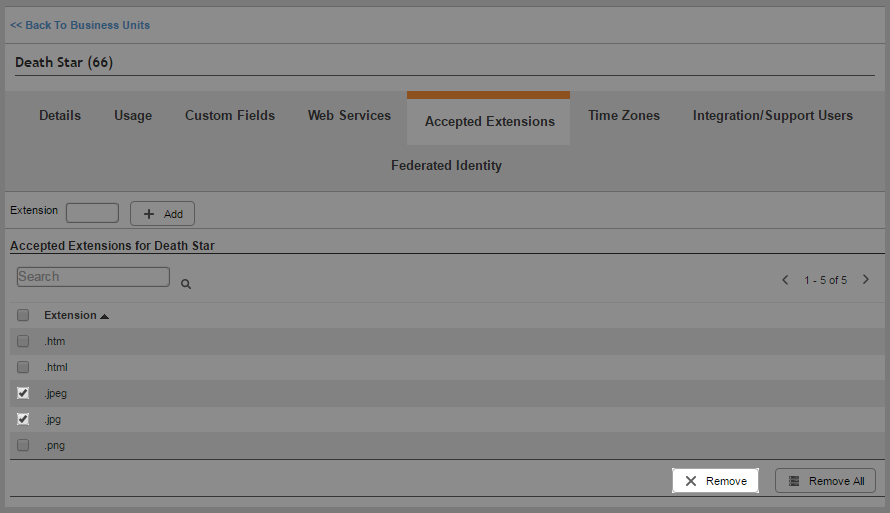
-
Click Admin → Account Settings → Business Units.
-
Locate the business unitFile format associated with Microsoft Excel; may also be expressed as .xlsx you want to modify and click it to open it.
- Click Accepted Extensions.
-
Select the checkboxes corresponding to the extensions you want to remove in the Accepted Extensions for Business Unit table. Click Remove. If you want to remove all extensions, click Remove All.


