Required security profile permissions: External Business Unit Edit
Federated Identity Management is the ability to use a trust relationship between your Identity Provider (IDP) authentication systems and the NICE inContact platform. This capability allows your company to register its IDP with the NICE inContact platform through the use of a secure certificate. Once this trust relationship is established, your IDP is authorized to send an Authorization assertion using the Security Assertion Markup Language 2.0 standard (SAML2.0) along with a claim establishing the Security Profile to be used by that user. Upon the successful receipt of this assertion, your authenticated user will be logged into the platform fully authenticated from your IDP.
There are several steps you must perform in order to use Federated Identity Management in your NICE inContact business unitFile format associated with Microsoft Excel; may also be expressed as .xlsx. You need to do them in conjunction with your NICE inContact Customer Support Representative, as this feature must be enabled by them for your business unit.
To enable Federated Identity Management for your business unitFile format associated with Microsoft Excel; may also be expressed as .xlsx, you must request that the Federated Identity feature be enabled by contacting your NICE inContact Customer Support Representative. Once the Federated Identity Management feature is enabled for your business unit, you must upload a Security Certificate that you will use when you send the Authentication assertion from your IDP. To do so, follow these steps.
-
Click Admin → Account Settings → Business Units.
-
Search for your business unit name and click to open it.
-
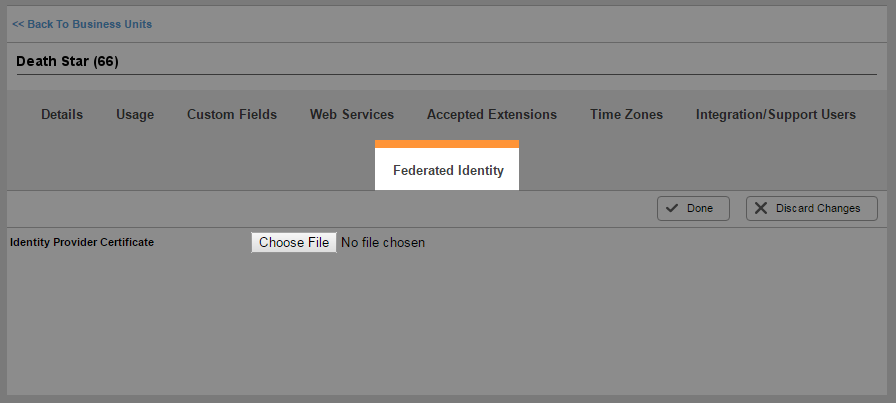
Click the Federated Identity tab and click Choose File to browse for your Identity Provider Certificate.
-
Select the Security Certificate that was generated from your IDP system.
If you are using ADFS as your Identity Provider with IIS, you can find instructions on how to create a security certificate from IIS and import it into ADFS in the Downloads section of the Developer Portal (https://developer.incontact.com/Downloads)
Now that you have loaded your security certificate into the platform, you must configure users for Federated Identity Management.


