Required security profile permissions: Scripts Lock Override
When you edit a script, Studio automatically locks it or requires that you lock it before editing. The locked tab contains a table that displays all locked scripts and information about them, including the username of the user currently editing the script.
For more information, see Tabs Overview.
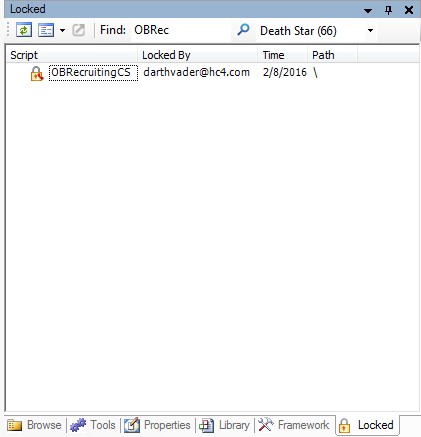
Toolbar
- Refresh

- Refreshes the table, loading current information about locked scripts.
- Sort by

-
Enables you to sort and filter the table. You can sort by the script name, the user editing the script, the time the script was locked, or the path containing the script. You can filter the table so it displays only scripts locked by you, only scripts locked by other users, or you can choose to display all locked scripts.
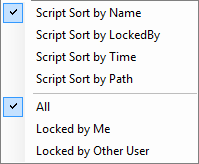
Sort
- Script Sort by Name — Sorts the locked script table alphabetically by the name of the script.
- Script Sort by LockedBy — Sorts the locked script table alphabetically by the username of the user editing the script.
- Script Sort by Time — Sorts the locked script table chronologically by the date and time the script was last locked.
- Script Sort by Path — Sorts the locked script table alphabetically by the location of the script.
Filter
- All — Displays scripts locked by you and other users in the locked script table.
- Locked by Me — Displays only scripts locked by you in the locked script table.
- Locked by Other User — Displays only scripts locked by users other than you in the locked script table.
- Kick

- Enables you to remove the lock on a script when another user has locked it, kicking the user off the script so you or someone else can lock and edit it.
- Find

- Enables you to search all columns in the locked scripts table for the typed phrase.
- Select Business Unit

- Enables you to select a specific business unitFile format associated with Microsoft Excel; may also be expressed as .xlsx. The table only displays locked scripts from the selected business unit.
Table Columns
- Script
- The name of the locked script.
- Locked By
- The username of the user currently locking the script.
- Time
- The date on which the script was last locked.
- Path
- The location of the script.


